
If more than one applicant will be included on the leasing agreement, especially if they are included in the house-hold income, we strongly recommend adding them as a co-applicant on the referral form.
Adding co-applicants allows OneApp to evaluate the full household profile, not just an individual applicant. This may strengthen OneApp approval odds by incorporating combined income and shared financial responsibility.
Adding co-applicants is easy. Start by creating a OneApp referral with the information for the primary applicant. In the Monthly Income field include the total verified income for all applicants who will be on the leasing agreement.
Please note: It is the responsibility of the property to verify any and all applicants' income included in the Monthly Income field.
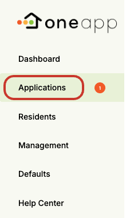
Once you have completed the referral, click on Applications in the right-hand menu.
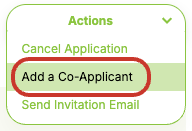
Use the filters, search, or simply scroll down to find and click on the relevant application. This will open the Application Detail page. From either the drop-down in the top-right corner or the button at the bottom of the application page click Add Co-Applicant(s).

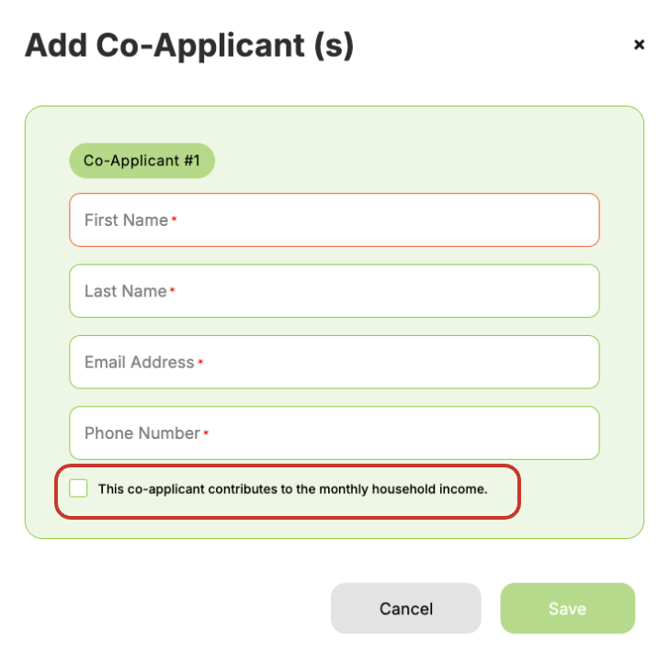
Here you can add one or more co-applicants by entering their first and last name, email, and phone number. Check the tick-box if this co-applicant's verified monthly income is included in the referral.
💡Good to know: If needed, applicants can also add co-applicants themselves directly within the application, avoiding additional manual input from your property team.