
How to refer a new applicant
- In your OneApp account, click the Refer a New Applicant button at the top right of your screen.

- On the Refer a New Applicant page:
- Enter the Property Details:
- Property Name: The name of your property.
- Monthly Base Rent Amount: The fixed monthly rent, excluding utilities and fees.
- Lease Duration: The duration of the lease in months.
- Enter the Applicant Details:
- First Name: The applicant's first name.
- Last Name: The applicant's last name.
- Phone Number: The applicant's primary phone number.
- Email: The applicant's primary email address.
- Verified Gross Monthly Income: The applicant's total income before taxes and other deductions.
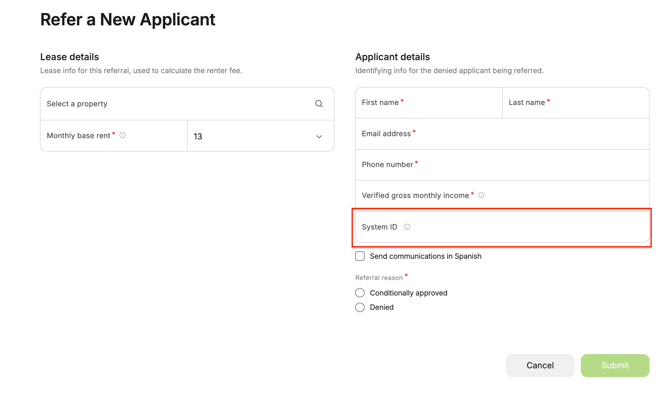
- System ID: The applicant's identification number (or alphanumerical) in your property management software - sometimes called a Prospect ID, Lead ID, or Applicant ID.
- Enter the Property Details:
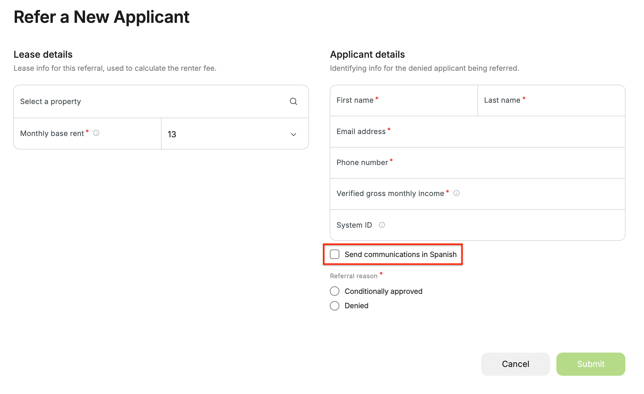
- You may also opt the applicant in for communications in Spanish by checking the box to Send communications in Spanish.
- Below the referral details, select the option that best describes the applicant's status:
- Conditionally Approved: After being screened, the application was conditionally approved.
- Denied: After being screened, the application was denied.
💡 Good to Know: OneApp applies consistent, proprietary criteria to identify applicants we’re confident can succeed as renters, even with credit setbacks or gaps in rental history. This approach helps expand access to housing.
- Once complete, select the reason for referral from the dropdown that appears. You can select the following reasons:
- Credit: The applicant doesn't meet your property's credit criteria.
- Income: The applicant doesn't meet your property's income criteria.
- Rental History: The applicant doesn't meet your property's rental history criteria.
- Eviction: The applicant doesn't meet your property's eviction criteria.
- Landlord Debt: The applicant doesn't meet your property's landlord debt criteria.
- Housing Authority Participant: The applicant is a housing authority participant.
- Other: The applicant doesn't meet your property's criteria in another area.
- Click Save.
- In the pop-up window, check the box to acknowledge that the resident has already been screened.
⚠️ Please Note: Applicants must be screened by your community before referral to qualify for coverage and default reimbursement. Learn more about default reimbursement requirements.
- Click Yes, Continue.
That's it! Once your referral is submitted, the applicant will receive a link from us via email to submit our free application and we'll guide them through the rest of the application process, keeping everything seamless for you and your applicant.