
For applicants referred through a nonprofit program, How to Refer a Nonprofit Program Applicant guide.
Referring an applicant with a housing voucher
- Follow all the standard referral steps outlined in the How to Refer an Applicant guide
- When you get to the Monthly base rent section:
- This number should be the fixed monthly rent, excluding utilities and fees, minus the voucher amount.
- In other words, the amount of the voucher should be subtracted from the base rent.
- For example, if base monthly rent is $1,200 and the renter's voucher amount is for $900, the amount that should be entered is $300.
-
- This number should be the fixed monthly rent, excluding utilities and fees, minus the voucher amount.
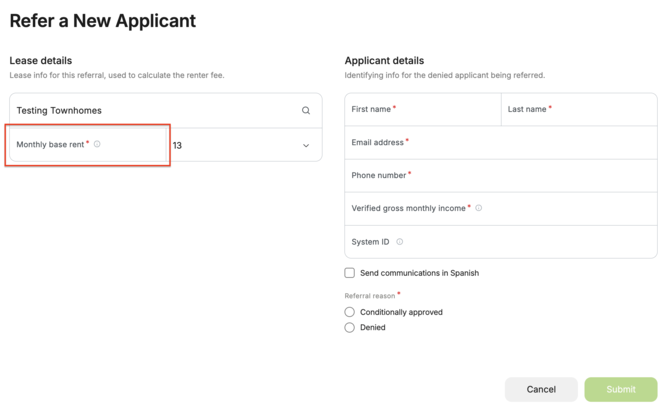
‼️ Important: This option helps applicants with housing vouchers qualify, but it also changes your property's coverage. Default reimbursement is capped at 3x the amount entered in the Monthly base rent field. If the voucher covers the full rent and you enter $0, then no default reimbursement is available.
Learn more about how Default reimbursements work.
-
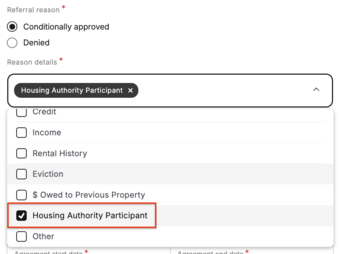
- Next, select a Referral Reason and choose the option for Housing Authority Participant under the Reason details.
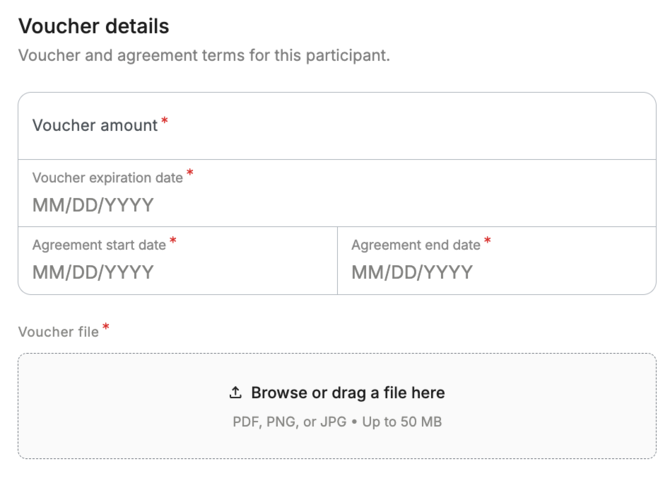
- Enter the Voucher details and upload the voucher document(s).
- Select Submit.
- In the pop-up window, check the box to acknowledge that the resident has already been screened.
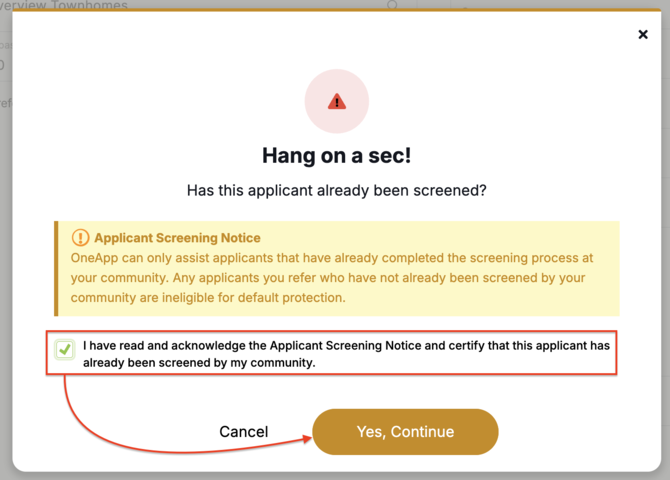
⚠️ Please Note: We cannot cover applicants who have not been screened by your community. Any applicants you refer who have not already been screened by your community are ineligible for default reimbursement. Learn more about default reimbursement requirements.
- Select Yes, Continue.
That's it! You've now successfully referred an applicant using a housing voucher to OneApp! Once your referral is submitted, the applicant will receive a link from us via email to submit our free application and we'll guide them through the rest of the application process, keeping everything seamless for you and your applicant.