
Here’s what each option in the submission form means:
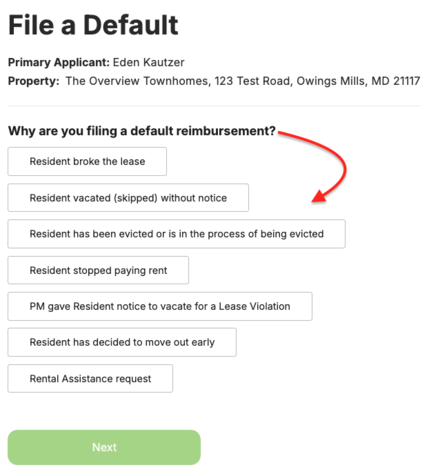
→ Resident broke the lease
Choose this when the resident broke the terms of their lease and the situation resulted in an early end to the tenancy.
→ Resident vacated (skipped) without notice
Choose this when the resident moved out or abandoned the unit without providing notice.
→ Resident has been evicted or is in the process of being evicted
Choose this when you've started the eviction process or the resident has already been evicted.
You'll need to provide applicable non-payment notices and eviction documentation with your request.
→ Resident stopped paying rent
Choose this when the resident has stopped paying rent, but the eviction process hasn't started yet.
⚠️ Important: Don't select this option if you're more than 30 days past the point when eviction should have started. In that situation, select Resident has been evicted or is in the process of being evicted.
→ PM gave Resident notice to vacate for a Lease Violation
Choose this when your property has formally asked the resident to vacate because of a lease violation.
You'll need to provide the applicable lease violation notice(s).
→ Resident has decided to move out early
Choose this when the resident has notified you that they plan to end their lease and move out before the scheduled lease end date.
→ Rental Assistance request
Choose this when you'd like to request Rental Assistance to help an eligible resident who has fallen behind on rent remain in their home.
Rental Assistance has its own eligibility and payout requirements and doesn't use the Early or Standard payout options.
→ Learn About Rental Assistance
➡️ What's next?
After selecting your reimbursement request type, you'll provide the documentation that applies to your situation.